A cloud-storage link
- Your stored file
- A link to that file
- They receive the whole document
The detail behind the idea: what you keep, what leaves, what expires and what we are still building.
Keep it. Show a piece of it. Change it once.
Your identity documents, your cards, and the details that keep changing. Your Unidy is sealed with an encryption key of its own, held on different machines from the information itself, and none of it is reachable from the open internet.
You choose what leaves your Unidy, field by field, who it goes to and for how long. A gym gets your name and that you are over 18, not your passport. You can take it back at any moment.
You move house, you change your address here. Everyone you authorised reads the new one from you, instead of writing to the place you left two years ago.
The first two are yours from the first day. The third grows as organisations connect to Unidy.
A real example
A gym needs your name, proof that you are over 18, sometimes an address. It does not need a permanent copy of your passport, driving licence or any other ID.
Your passport
What the gym receives
NameAlex C.
Alex C.
Over 18Verified
Verified
Expires12 Mar 2031
12 Mar 2031
Passport number••••••••
Not shared
Date of birth••••••••
Not shared
Document image••••••••
Not shared
Copy made for ABC Gym · 20 Sep 2026 · access expires in 15 minutes
If someone already downloaded a copy, revoking access cannot erase it from their computer. That is why every copy carries the name of who received it, and when.
Show a QR code, or read out a short code. The other person needs no app and no account.
Being built
A cloud-storage link gives someone the file you uploaded. With an identity document, that means handing over everything on it: your photograph, your document number, your date of birth, your signature, whatever else the page happens to carry.
Unidy works the other way round. Your original stays inside your Unidy, and no link ever points at it. When you authorise something, Unidy makes a new document at that moment, holding only what you chose to disclose, addressed to one recipient.
The link never points to your original document.
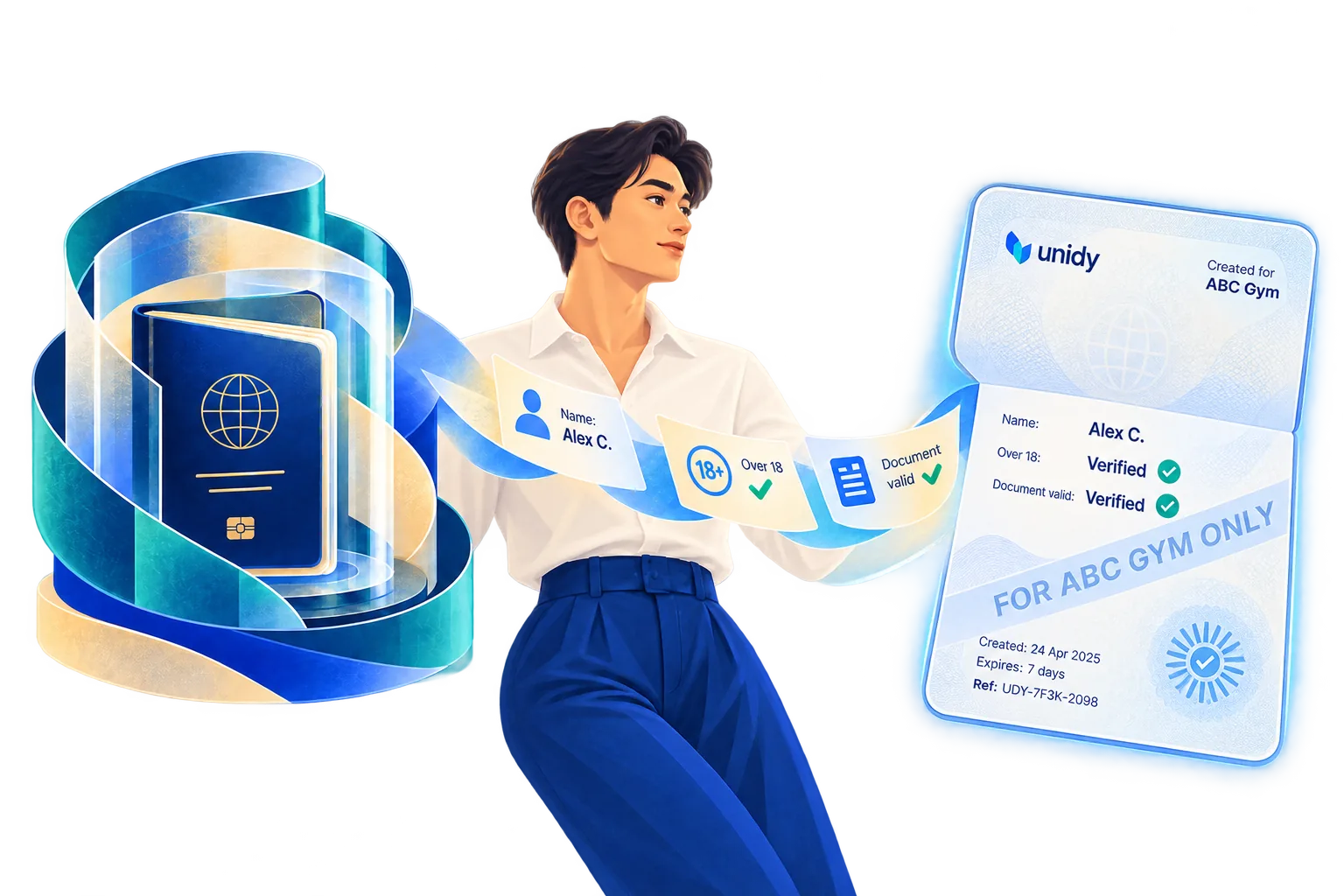
A cloud-storage link is an address for a file that already exists. A Unidy link is a request: it asks for a document to be made for whoever is standing in front of you.
Google Drive
drive.google.com/file/d/1A2b3C4dE5fG6hI7jK8lM/view
Opens the file you uploaded. Anyone holding the address sees the whole passport.
Dropbox
dropbox.com/s/9qz1x2c3v4b5n6m/passport.jpg
Same thing, and the name of the file often says what it is before anyone opens it.
Unidy
unidy.me/7F3K29
Points at no file. It asks Unidy for the version made for this recipient, and it stops working when you say so.
The document you uploaded stays inside your Unidy. It is never the file that gets sent, and never what a link opens.
A few fields, a version with the rest blacked out, or a plain verified answer such as “over 18”. You decide, for this recipient, for this reason.
A new document, made when it is asked for, carrying who it is for, why, when it was made, when it stops working, and a mark that belongs to that recipient alone.
| Cloud-storage link | Unidy | |
|---|---|---|
| What is shared | The stored file, or a full copy of it | A version made for the occasion |
| Your original | Delivered, or downloadable | Never shared |
| What it discloses | Everything on the document | Only what you authorised |
| Who it was for | Not usually visible in the file | Written into the version itself |
| Visible watermark | Not normally tied to a recipient | Names the recipient |
| Expiry | Can be set on the link | Belongs to the version and the access |
| If it turns up elsewhere | Hard to tell which copy travelled | The version points back to who it was made for |
| Access history | Depends on the plan and how the link was made | Part of how sharing works |
A generated document is tied to the Unidy who authorised it, the recipient it was made for, the stated purpose, what it contains, when it was made, when it expires, and its own identifier. Each time it is opened through Unidy is recorded against it.
If a version turns up where it should not, its markings say which recipient it was made for. That is not the same as proving who passed it on: anyone with that version in their hands could have. What it removes is the anonymous copy that could have come from anywhere.
You can stop a version working from now on, and your original is never at risk either way, because nothing ever pointed at it. What we cannot do is reach into somebody’s computer: a version already downloaded or photographed stays downloaded. That is exactly why it carries their name.
Drive, Dropbox and OneDrive are good at what they are for. A link can need a password, expire next week, or be withdrawn. What none of them can do is make the file itself say less: the thing being delivered is still the whole document. They are not built to share an identity document without exposing the file you stored.
Secure delivery is not the same as safe disclosure.
Move once. Update once.
Change your address, phone number or email in your Unidy. The organisations you have authorised take the new value from you, instead of you repeating the same paperwork dozens of times.
Once, in your Unidy.
Your bank and your insurer, not the shop you used once.
From you, when they need it. No forms, no phone calls.
Being builtThis is the second way of sharing: not a document handed over once, but a detail that stays correct by itself. It grows as organisations connect to Unidy, so it is the model we are building rather than something that works everywhere today.

Privacy architecture
Every Unidy is encrypted with a separate key of its own, and no master key exists that opens everybody’s. The keys are not stored beside the information: they live in a separate system, on separate machines.
Take our entire database and you face one separate lock per person, not one door.
Your information lives on one machine. The keys that open it live on another.
Your personal information is not sold, rented or handed over in readable form.
What we will not tell you: that we could never read anything. We hold the keys, because a key that exists only on your phone dies with your phone. What we can promise is that no single key opens everybody’s information, and that the keys are kept away from it.
What this protects you from, and what it does not →
The same idea, applied to more of the paperwork in your life.
In the first release
Passport, ID, licence, insurance, cards. In one place, with a warning months before anything runs out.
In the first release
At a counter, in seconds, with only the fields you picked.
In the first release
A standard sign-in button for websites, showing exactly what each one receives.
Being built
A new address or phone number reaches the organisations you authorised.
Where this goes
“Over 18: verified” instead of your date of birth. A shipping price without the shop learning where you live.
Where this goes
Decide in advance who may reach what, so your family is not left searching for months.
Two places carry the parts that matter most, in full.